
You asked for it, so here it is. We are going to see how healthy you pool is. How many champions you counter and synergize with. How blindable it is. How you can make it better. How you can build one from scratch.
https://pooldesigner.machineloling.com
Let’s go over what you’ll find there.
The Sidebar

Here you can do a few important things:
- Choose your role and use the drop-down to make a pool. We limit pools to 8 because it’s really unrealistic to be accumulating mastery on more than that. Sure you “play” 20 champions, but if you do you don’t truly play any. Champions require reps. These are you main reppers.
- Pick how many “Top-X” you want to have that can match-up or synergize with other champions. If you have a 3 champ pool for solo queue, set it to 1. You only need one response. If you play comp, set it higher.
- Score weights: Set how much you care about in-lane match-ups, out of lane match-ups, team synergies, and blindability. If you’re always counter-picking, set blindability to 0. If you want all your picks to be blindable, make it higher. It will be used in pool health, replacement picker, and pool designer.
- Pick patch play rate: Let’s you adjust which patch’s play rates to use.
- PR-weighted scoring: When checked, every opponent (or partner) column in the math is weighted by how often that champion is actually picked in solo queue. Most solo queue players want it on.
- Opponent / partner pick-rate floor: The minimum PR a champion needs to even show up in the math. Below the floor, they’re filtered out completely.
Pool Health

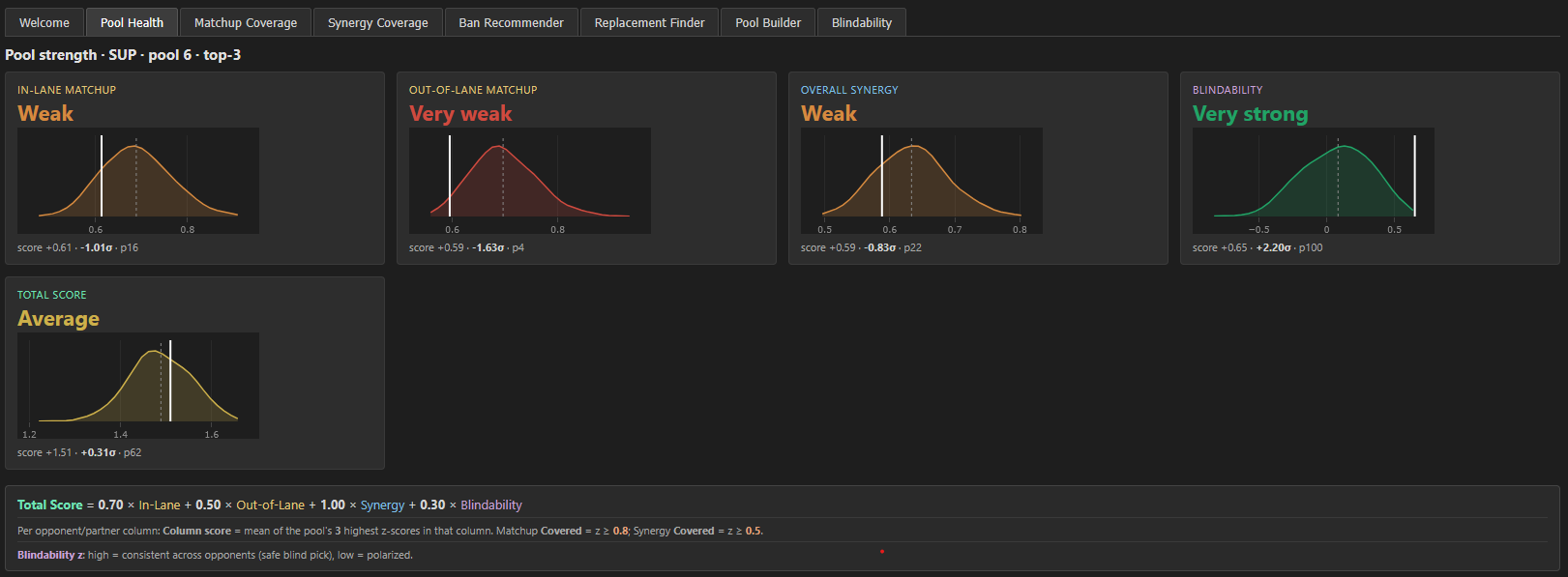
Pool Health is the one-page report card for your pool. Five panels, each comparing your pool against thousands of random pools at the same role/size to show whether you’re meta-good, average, or off the deep end.
How to read each panel:
- The curve = distribution of every possible 6-champion SUP pool (or whatever role/size you’re set to) scored against the meta. The fat middle is “typical.” Recalcs with every slider move.
- The white vertical line = where YOUR pool lands.
- The big tier label (“Very strong”, “Average”, etc.) = derived from how far left/right of the curve you are, in standard deviations.
- The numbers underneath:
scoreis the raw value,σis your distance from the curve mean (the bold one — that’s what matters),pis your percentile (p100 = you’re better than every random pool).
The four component panels:
- In-Lane Matchup — how well your pool counters the role you actually share lane with (TOP/MID/JUNGLE = same role; ADC/SUP = both).
- Out-of-Lane Matchup — how well it counters every other role. Catches whether your pool can punish enemy picks outside your lane.
- Overall Synergy — how well your pool synergizes with random teammates (averaged across the four other roles).
- Blindability — how consistent your pool’s best picks are across all opponents and teammates. High = you can blind-pick safely. Low = you’re polarized and need to counter-pick to be effective.
- Total Score is just the weighted sum from the sidebar. It collapses the four into a single number ranked against random pools so you have one tier verdict for “is this pool actually good.” The sliders in the sidebar will affect what “good” is.
Match-up and Synergy Coverage

The match-up and synergy coverage tabs are where you can see which champions your pool is best at. The “Top-X” can easily be visualized here, with your best 3 responses to each champion in bold. You have good responses to champions on the left, bad responses to champions on the right. A blue play rate bar is at the top to show how often you encounter those champions in solo queue.
Ban Recommender

Ban Recommender answers: “of all the champions you might face, who’s worth burning a ban on?”
Most ban tools just tell you who’s strong in the meta. This one accounts for your specific pool and the meta at the same time (if PR-weighting is checked).
Ban score(X) = w(X) / (W − w(X)) × (μ − r(X))
Translation: “how much does your expected matchup quality at that position go up if X gets removed from the opponent pool”. Two ingredients:
- r(X) = your pool’s best response to opponent X (in pp). Low r(X) = you have no good answer.
- μ = the average best-response across all the opponents you might face at that position. The baseline.
- w(X) / (W − w(X)) = PR weighting (only when PR-weighted scoring is on) — popular champs matter more because you’ll see them more.
So Ban score = high when the opponent is common AND bad for you. In this example, Ivern is your pool’s worst match-up, but no one plays him. Leona is bad for you AND in the meta.
Replacement Finder

This is where you cook. You can either add to your pool or replace a champion. You can pick from candidates below, sorted by the one that will increase your total score by the most. You can see your current score as white dotted lines and the shift as colored lines. Tweak your equation and check out what champions make your pool the best.
Pool Builder

Here you can have it build a pool from scratch. Put in champions you know you want, ones you might want, and set your size. It will test EVERY combination and list them out in order of strength.
Blindability

Yeah, you all love this so I made it awesome. Look by patch, look by solo-queue play-rate weighted. See all the champions if you want. Go crazy.
Details
We are using normalized deltas from patches 16.1-16.4, same as last post. I update the play rates by patch, but not normalized deltas. I’ve found these to be very stable even across years, so it should be fine to assume the only changes we see from patch to patch on lolalytics are noise.
And that’s it! We are starting to roll with the content now to see what appetite you all have for this kind of thing, so if you want more please share, follow, etc. We are on reddit, x, kofi so far.
Acknowledgments
Special thanks to Allen Zhu for all his help brainstorming this.

Leave a Reply to ZokaliCancel reply